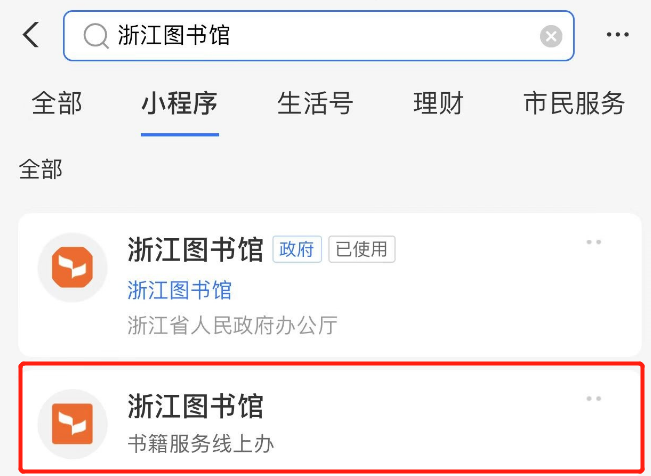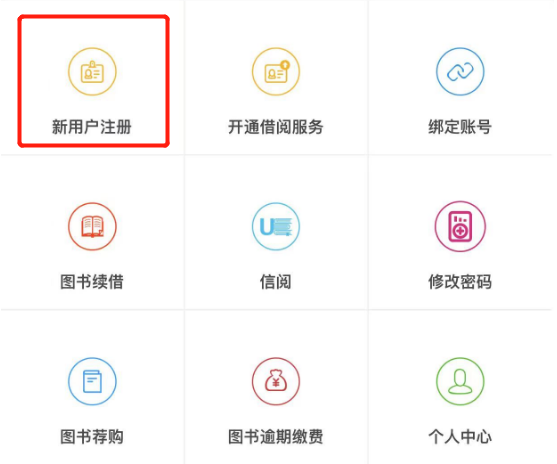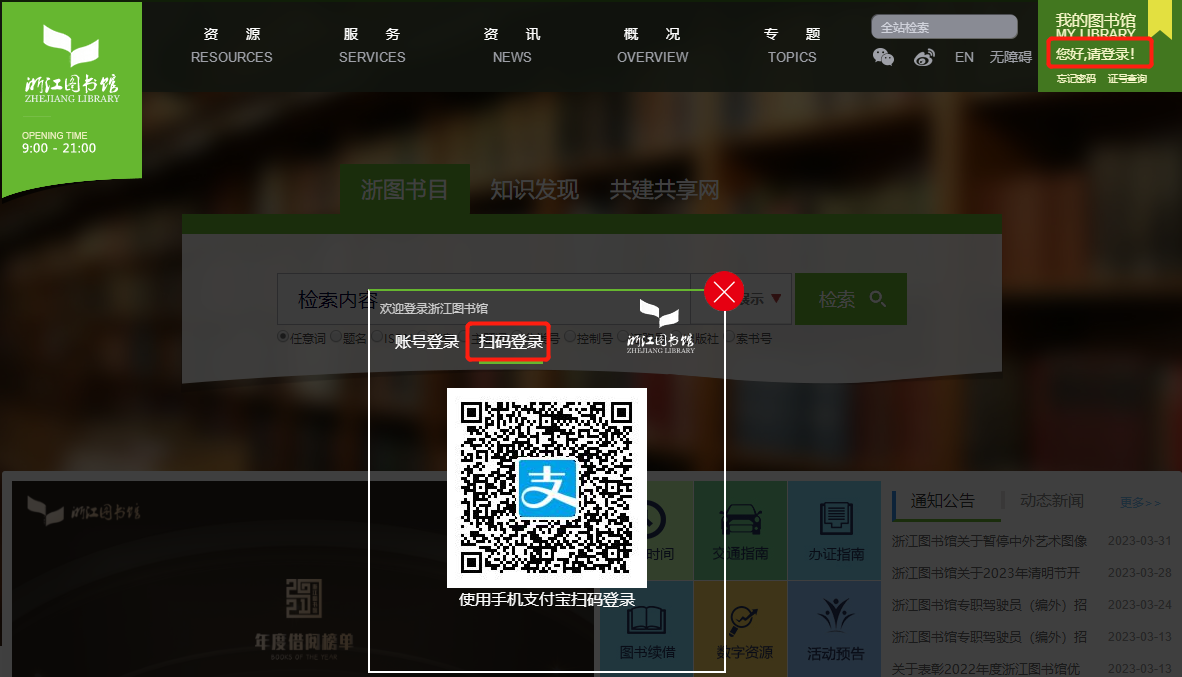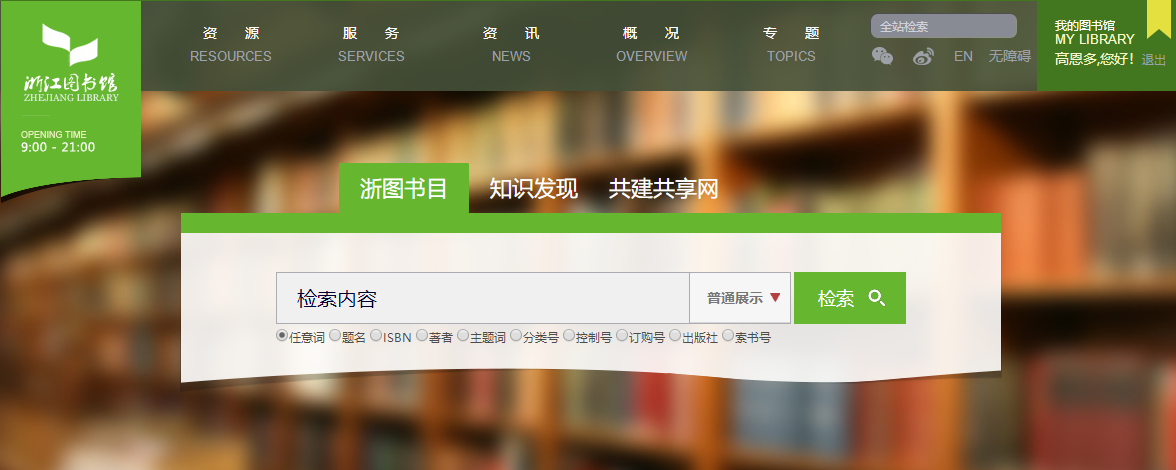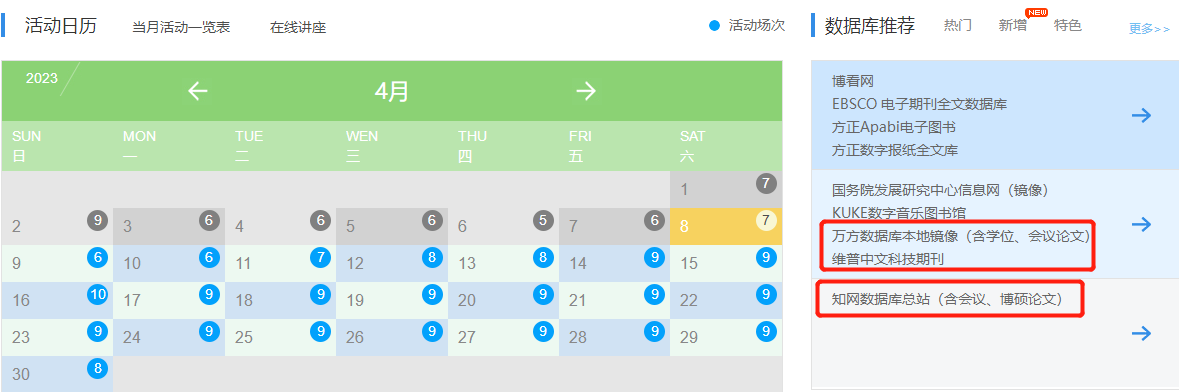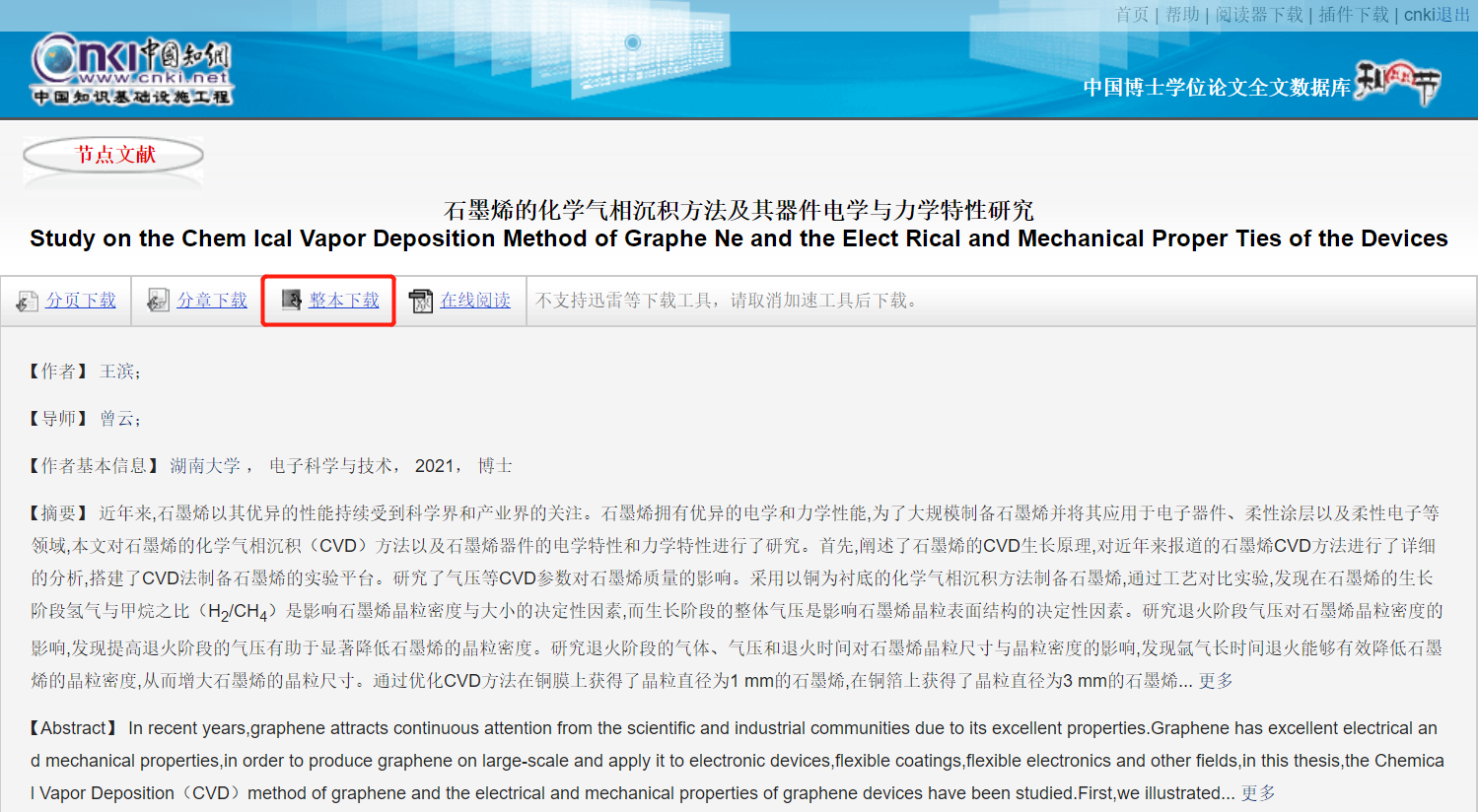

学校没有买数据库,如何免费下载知网文献?

学术干货|2023-11-27 09:49:39|阅读量:5770

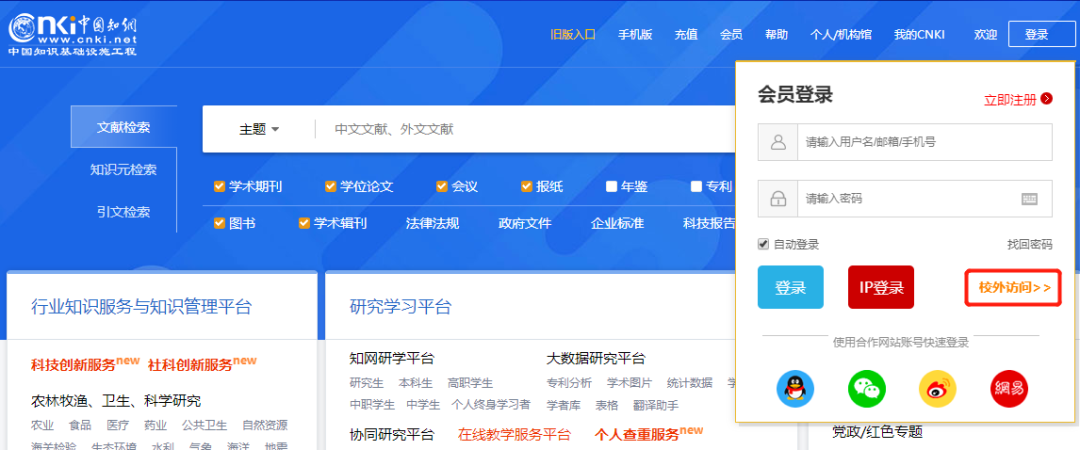
<span style="color: rgb(0, 0, 0); font-family: 宋体; font-size: 14px; letter-spacing: 2.24px; text-align: justify; word-spacing: 1.4px; background-color: rgb(255, 255, 255);">  近日,中科院创建了自己了数据库,命名为<b>Pubscholar公益学术平台</b>,8000万免费文献,可检索1.7亿。但Pubscholar目前仅能下载中科院的论文,其它的文献是没有下载权限的。所以广大学子最后还是绕不开知网。<b>知网的中文文献主要有两个作用,一是入门前对学位论文进行学习熟悉领域,二是毕业时参考别人的毕业论文目录和引言来撰写毕业论文</b>。只要学校买了数据库,即使在家也可以免费下载,只需要在登录时选择“校外访问”即可。</span> <div><span style="color: rgb(0, 0, 0); font-family: 宋体; font-size: 14px; letter-spacing: 2.24px; text-align: justify; word-spacing: 1.4px; background-color: rgb(255, 255, 255);"><br> </span></div> <div align="center"><img src="/Uploads/2023-11-21/655c4dc643f25.png" width="600" alt="学校没有买数据库,如何免费下载知网文献?"><span style="color: rgb(0, 0, 0); font-family: 宋体; font-size: 14px; letter-spacing: 2.24px; text-align: justify; word-spacing: 1.4px; background-color: rgb(255, 255, 255);"><br> </span></div> <div align="center"><br> </div> <div align="left"><span style="color: rgb(0, 0, 0); font-family: 宋体; font-size: 14px; letter-spacing: 2.24px; text-align: justify; word-spacing: 1.4px; background-color: rgb(255, 255, 255);">  </span></div> <div align="left"><span style="color: rgb(0, 0, 0); font-family: 宋体; font-size: 14px; letter-spacing: 2.24px; text-align: justify; word-spacing: 1.4px; background-color: rgb(255, 255, 255);"><br> </span></div> <div align="center"><span style="color: rgb(0, 0, 0); font-family: 宋体; font-size: 14px; letter-spacing: 2.24px; text-align: justify; word-spacing: 1.4px; background-color: rgb(255, 255, 255);">  但部分学校的学生面临这样一个问题,就是学校没有买数据库,那要<b>如何免费下载</b>呢?教你一个免费的方法,不但可以<b>下载知网的,还有万网、维普都</b>可以。只需要注册浙江图书馆就可以。</span></div> <div align="left"><span style="color: rgb(0, 0, 0); font-family: 宋体; font-size: 14px; letter-spacing: 2.24px; text-align: justify; word-spacing: 1.4px; background-color: rgb(255, 255, 255);"><br> </span></div> <div align="left"><span style="color: rgb(0, 0, 0); font-family: 宋体; font-size: 14px; letter-spacing: 2.24px; text-align: justify; word-spacing: 1.4px; background-color: rgb(255, 255, 255);"><br> </span></div> <p style="text-align: center;"><span style="font-size: 18px;"><b><br> </b></span></p> <p style="text-align: center;"><span style="font-size: 18px;"><b>使用教程</b></span></p> <p style="text-align: center;"><span style="color: rgb(0, 0, 0); font-family: 宋体; font-size: 14px; letter-spacing: 2.24px; text-align: justify; word-spacing: 1.4px; background-color: rgb(255, 255, 255);">首先打开支付宝搜索<b>“浙江图书馆</b>”,进入<b>“浙江图书馆”</b>小程序。</span><span style="font-size: 18px;"><b><br> </b></span></p> <p style="text-align: center;"><span style="color: rgb(0, 0, 0); font-family: 宋体; font-size: 14px; letter-spacing: 2.24px; text-align: justify; word-spacing: 1.4px; background-color: rgb(255, 255, 255);"><br> </span></p> <p style="text-align: center;"><img src="/Uploads/2023-11-21/655c4e9003bf1.png" width="600"alt="学校没有买数据库,如何免费下载知网文献?"><span style="font-size: 18px;"><b><br> </b></span></p> <p style="text-align: center;"><span style="color: rgb(0, 0, 0); font-family: 宋体; font-size: 14px; letter-spacing: 2.24px; text-align: justify; word-spacing: 1.4px; background-color: rgb(255, 255, 255);"><br> </span></p> <p style="text-align: center;"><span style="color: rgb(0, 0, 0); font-family: 宋体; font-size: 14px; letter-spacing: 2.24px; text-align: justify; word-spacing: 1.4px; background-color: rgb(255, 255, 255);">选择<b>“新用户注册”</b>进行身份注册。(由于系统更新以及排版问题该菜单栏的位置会发生变化,但大家只要找到这个新用户注册就行)</span><br> </p> <p style="text-align: center;"><span style="color: rgb(0, 0, 0); font-family: 宋体; font-size: 14px; letter-spacing: 2.24px; text-align: justify; word-spacing: 1.4px; background-color: rgb(255, 255, 255);"><br> </span></p> <p style="text-align: center;"><img src="/Uploads/2023-11-21/655c4ec553169.png" width="600" alt="学校没有买数据库,如何免费下载知网文献?"><span style="color: rgb(0, 0, 0); font-family: 宋体; font-size: 14px; letter-spacing: 2.24px; text-align: justify; word-spacing: 1.4px; background-color: rgb(255, 255, 255);"><br> </span></p> <p style="text-align: center;"><br> </p> <p style="text-align: center;"><span style="color: rgb(0, 0, 0); font-family: 宋体; font-size: 14px; letter-spacing: 2.24px; text-align: justify; word-spacing: 1.4px; background-color: rgb(255, 255, 255);">注册好了后用之前领取到的网址直接打开<b>“浙江图书馆”</b>选择支付宝扫码登录。</span><br> </p> <p style="text-align: center;"><span style="color: rgb(0, 0, 0); font-family: 宋体; font-size: 14px; letter-spacing: 2.24px; text-align: justify; word-spacing: 1.4px; background-color: rgb(255, 255, 255);"><br> </span></p> <p style="text-align: center;"><img src="/Uploads/2023-11-21/655c4eea03007.png" width="600"alt="学校没有买数据库,如何免费下载知网文献?"><span style="color: rgb(0, 0, 0); font-family: 宋体; font-size: 14px; letter-spacing: 2.24px; text-align: justify; word-spacing: 1.4px; background-color: rgb(255, 255, 255);"><br> </span></p> <p style="text-align: center;"><span style="color: rgb(0, 0, 0); font-family: 宋体; font-size: 14px; letter-spacing: 2.24px; text-align: justify; word-spacing: 1.4px; background-color: rgb(255, 255, 255);">登录后会跳转至该页面</span><br> </p> <p style="text-align: center;"><span style="color: rgb(0, 0, 0); font-family: 宋体; font-size: 14px; letter-spacing: 2.24px; text-align: justify; word-spacing: 1.4px; background-color: rgb(255, 255, 255);"><br> </span></p> <p style="text-align: center;"><img src="/Uploads/2023-11-21/655c4f0864627.png" width="600" alt="学校没有买数据库,如何免费下载知网文献?"><span style="color: rgb(0, 0, 0); font-family: 宋体; font-size: 14px; letter-spacing: 2.24px; text-align: justify; word-spacing: 1.4px; background-color: rgb(255, 255, 255);"><br> </span></p> <p style="text-align: center;"><span style="color: rgb(0, 0, 0); font-family: 宋体; font-size: 14px; letter-spacing: 2.24px; text-align: justify; word-spacing: 1.4px; background-color: rgb(255, 255, 255);"><br> </span></p> <p style="text-align: center;"><span style="color: rgb(0, 0, 0); font-family: 宋体; font-size: 14px; letter-spacing: 2.24px; text-align: justify; word-spacing: 1.4px; background-color: rgb(255, 255, 255);">下滑至页面末尾,选择<b>“知网数据库总站"</b>。当然你也可以选择万方和维普进行免费下载文献。</span><br> </p> <p style="text-align: center;"><span style="color: rgb(0, 0, 0); font-family: 宋体; font-size: 14px; letter-spacing: 2.24px; text-align: justify; word-spacing: 1.4px; background-color: rgb(255, 255, 255);"><br> </span></p> <p style="text-align: center;"><img src="/Uploads/2023-11-21/655c4f29c871f.png" width="600" alt="学校没有买数据库,如何免费下载知网文献?"><span style="color: rgb(0, 0, 0); font-family: 宋体; font-size: 14px; letter-spacing: 2.24px; text-align: justify; word-spacing: 1.4px; background-color: rgb(255, 255, 255);"><br> </span></p> <p style="text-align: center;"><br> </p> <p style="text-align: center;"><span style="color: rgb(0, 0, 0); font-family: 宋体; font-size: 14px; letter-spacing: 2.24px; text-align: justify; word-spacing: 1.4px; background-color: rgb(255, 255, 255);">进去后界面和知网有些变化,但数据库差不多的,检索了下我的<b>硕士毕业论文</b>,是可以检索到的。选择<b>“快速检索”</b>输入关键词或题目即可。</span><br> </p> <p style="text-align: center;"><span style="color: rgb(0, 0, 0); font-family: 宋体; font-size: 14px; letter-spacing: 2.24px; text-align: justify; word-spacing: 1.4px; background-color: rgb(255, 255, 255);"><br> </span></p> <p style="text-align: center;"><img src="/Uploads/2023-11-21/655c4f72432fc.png" width="600" alt="学校没有买数据库,如何免费下载知网文献?"><span style="color: rgb(0, 0, 0); font-family: 宋体; font-size: 14px; letter-spacing: 2.24px; text-align: justify; word-spacing: 1.4px; background-color: rgb(255, 255, 255);"><br> </span></p> <p style="text-align: center;"><br> </p> <p style="text-align: center;"><span style="color: rgb(0, 0, 0); font-family: 微软雅黑, " microsoft="" yahei";="" font-size:="" 14px;="" letter-spacing:="" 2.24px;="" text-align:="" justify;="" word-spacing:="" 1.4px;="" background-color:="" rgb(255,="" 255,="" 255);"="">选择合适的毕业论文选择<b>”整本下载“</b>即可</span><br> </p> <p style="text-align: center;"><span style="color: rgb(0, 0, 0); font-family: 微软雅黑, " microsoft="" yahei";="" font-size:="" 14px;="" letter-spacing:="" 2.24px;="" text-align:="" justify;="" word-spacing:="" 1.4px;="" background-color:="" rgb(255,="" 255,="" 255);"=""><br> </span></p> <p style="text-align: center;"><img src="/Uploads/2023-11-21/655c4f963bc09.png" width="600" alt="学校没有买数据库,如何免费下载知网文献?"><span style="color: rgb(0, 0, 0); font-family: 微软雅黑, " microsoft="" yahei";="" font-size:="" 14px;="" letter-spacing:="" 2.24px;="" text-align:="" justify;="" word-spacing:="" 1.4px;="" background-color:="" rgb(255,="" 255,="" 255);"=""><br> </span></p> <p style="text-align: center;"><span style="color: rgb(0, 0, 0); font-family: 微软雅黑, " microsoft="" yahei";="" font-size:="" 14px;="" letter-spacing:="" 2.24px;="" text-align:="" justify;="" word-spacing:="" 1.4px;="" background-color:="" rgb(255,="" 255,="" 255);"="">可下载<b>caj格式的文献</b></span><br> </p> <p style="text-align: center;"><img src="/Uploads/2023-11-21/655c4fb714c92.png" width="600"alt="学校没有买数据库,如何免费下载知网文献?"><span style="color: rgb(0, 0, 0); font-family: 微软雅黑, " microsoft="" yahei";="" font-size:="" 14px;="" letter-spacing:="" 2.24px;="" text-align:="" justify;="" word-spacing:="" 1.4px;="" background-color:="" rgb(255,="" 255,="" 255);"=""><b><br> </b></span></p> <p style="text-align: center;"><br> </p> <p style="text-align: center;"><span style="box-sizing: border-box; font-size: 14px; letter-spacing: 0.544px; text-align: justify; text-transform: uppercase; background-color: rgb(250, 250, 250); font-family: mp-quote, -apple-system-font, BlinkMacSystemFont, Arial, sans-serif; color: rgb(65, 70, 76);">此外,也可以通过</span><a href="https://www.uconf.com/conference" target="_blank" style="box-sizing: border-box; background-image: initial; background-position: initial; background-size: initial; background-repeat: initial; background-attachment: initial; background-origin: initial; background-clip: initial; color: rgb(66, 139, 202); text-decoration-line: none; font-size: 14px; letter-spacing: 0.544px; text-align: justify; text-transform: uppercase; font-family: mp-quote, -apple-system-font, BlinkMacSystemFont, Arial, sans-serif;">爱科会易</a><span style="box-sizing: border-box; font-size: 14px; letter-spacing: 0.544px; text-align: justify; text-transform: uppercase; background-color: rgb(250, 250, 250); font-family: mp-quote, -apple-system-font, BlinkMacSystemFont, Arial, sans-serif; color: rgb(65, 70, 76);">(WWW.UCONF.COM)</span><span style="box-sizing: border-box; font-size: 14px; letter-spacing: 0.544px; text-align: justify; text-transform: uppercase; background-color: rgb(250, 250, 250); font-family: mp-quote, -apple-system-font, BlinkMacSystemFont, Arial, sans-serif; color: rgb(65, 70, 76);">官方平台获取更多期刊、会议的投稿渠道及相关问题咨询。</span><br> </p>